• Skip to primary navigation
  • Skip to main content
  • Skip to primary sidebar
  • Skip to footer

Social Media Examiner

Your Guide to the Marketing Jungle

  • ? Free Newsletter
  • ?️ Podcasts
    • Social Media Marketing Podcast
    • AI Explored Podcast
    • Social Media Marketing Talk Show
    • Our YouTube Channel
  • ? AI Society
  • ?️ Marketing Conference
  • ? Partner With Us
    • Email Sponsorship
      • Email Newsletter
      • Dedicated Email Blast
    • Event Sponsorship
      • Social Media Marketing World
  • ? About Us
    • Marketing Events
  • Search
  • Social Media Marketing WorldImprove your strategy & find your next big marketing ideas!DISCOVER WHAT YOU'VE BEEN MISSING

    3 Steps to More Traffic With The Digg Digg Plugin

    by Ben Beck / June 23, 2011

    social media tools

    Wondering how to make it easy for people to share your great content? Keep reading…

    You've done the hard part, which is creating compelling content that will keep your readers coming back to your blog again and again. Now that you have these amazing posts, the next obstacle is to get people to share your content.

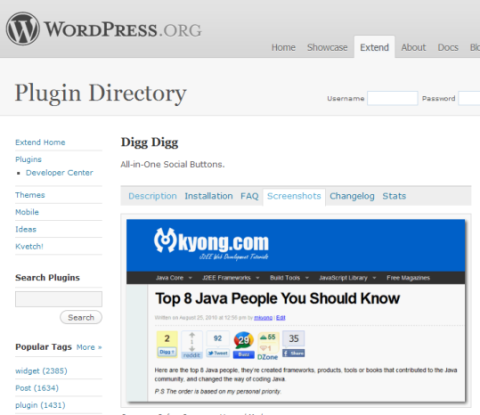
    I found this great WordPress plugin called Digg Digg, an all-in-one social sharing tool. It's easy to configure and offers lots of choices.
    digg digg
    Here's what Digg Digg looks like.

    #1: The Blog Setup

    You can select and organize which social sharing buttons to display on your blog post.

    The plugin comes with the option to add several popular social sharing sites such as Digg, Reddit, Google Buzz, StumbleUpon and several more. Personally I use it for the big 3—Facebook, Twitter and LinkedIn.

    If you're not sure how to set up this plugin, I found this video tutorial by MaryKay Edelmen to be very helpful.

    https://www.youtube.com/watch?v=ikX78vf4aRc

    wordpress digg digg
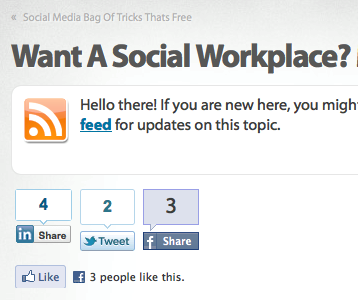
    Digg Digg allows you to integrate popular social buttons into WordPress easily.

    #2: The Social Setup

    Most of your readers already have accounts set up on Facebook, LinkedIn and Twitter. LinkedIn is very effective when you join groups around your niche. Digg, StumbleUpon and Reddit can also be great places to post your blog article as well.

    With Digg Digg you can select all sorts of different social sharing buttons.

    social media icons
    Major social media icons that you should put on your blog posts.

    #3: Clicks to Millions of Eyeballs

    Once you've set up the Digg Digg plugin, you're ready for viewers to share your posts. Posting on these social networks puts your blog post in front of millions of eyes, and makes it simple for your followers to pass your great content onto their followers.

    You can also use Digg Digg yourself to post your content. In the following video, I show you how easy it was to share my blog posts to all of my followers.

    .

    All These Impressions… Now What?

    You're probably saying to yourself, “That was simple! In just 3 steps I can have my articles in front of thousands or millions of eyeballs.” It's true, you can. But if nobody bothers to click and read your post, what's the point?

    This is why it's really important that you take the time to think of a headline and status to entice people to read your blog. Chris Garrett wrote an excellent article called “10 Ways to Cut Through the Social Media Noise and be Heard.” If you're struggling with getting clicks on your blog, this is a great read to get out of the rut.

    Do you engage?

    I'd like to hear what you do to engage people to read your blog posts. How can we turn these millions of impressions into millions of clicks and comments on your blog? Leave your comments and tips in the box below.

    Tags: Blogging

    About the authorBen Beck

    Benjamin is the creator of Link Building Class, and helps local businesses market themselves successfully online at LocalStampede.com
    Other posts by Ben Beck »

    Get Social Media Examiner’s Future Articles in Your Inbox!

    Get our latest articles delivered to your email inbox and get the FREE Social Media Marketing Industry Report (43 pages, 60+ charts)!

    Industry Report Cover

    Worth Exploring:

    Facebook

    Marketing Help Explore More →

    Instagram

    Marketing Help Explore More →

    YouTube

    Marketing Help Explore More →

    Linkedin

    Marketing Help Explore More →

    AI

    Next Frontier Explore More →

    Social Media Marketing Industry Report

    Get Free Report →

    Social Marketing Trends

    The data you've been missing!

    Need a new plan? Discover how marketers plan to change their social activities in the 16th annual Social Media Marketing Industry Report. It reveals what marketers have planned for their social activities, content marketing, and more! Get this free report now and never miss another great article from us. Join more than 385,000 marketers!

    Simply click the button below to get the free report:

    Footer

    Your Guide to the Marketing Jungle
    Copyright © 2026 Social Media Examiner®
    All Rights Reserved. Terms of Use | Privacy Policy.

    Helpful Links

    • About us
    • Our content via email
    • Our podcasts
    • Our YouTube channel
    • Our live show
    • Our social media markting industry report
    • Our generative AI marketing industry Report
    • Sponsorship opportunities
    • RSS