by
by 
 Is the Pinterest algorithm burying your pins?
Looking for tips to get better exposure in the Pinterest Smart Feed?
Pinning more isn't always the answer to increasing your visibility on Pinterest.
In this article you'll discover four ways to improve the quality of your pins and boards on Pinterest.

Listen to this article:
Where to subscribe: Apple Podcasts | Spotify | YouTube Music | YouTube | Amazon Music | RSS
#1: Clean Up Your Account Every Month
For Pinterest's algorithm to view your account as high-quality, you'll want to focus on curating the best of the best. In turn, Pinterest will be more likely to recommend your pins to others.
Not all popular pins are created equal and many of your account's pins won't get substantial repins from your followers. To make sure your account is up to date, set aside time once a month to go through your boards and delete all of the pins that have fewer than five repins.
Here's an easy way to delete underperforming pins from a board:
Click on the board and then click on the Move Pins button at the top right corner of the board. Next, click on the red Move button. Now you're able to scroll down and view all of the pins on your board and note the number of repins each one has generated.
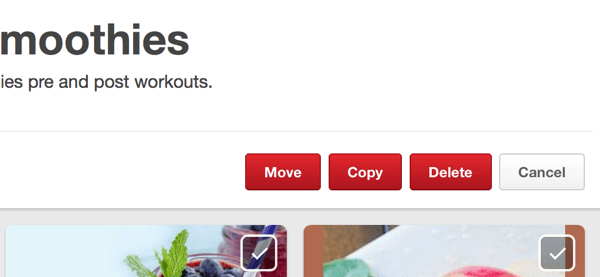
Select the checkmark on each pin that has fewer than five repins. When you're done, click the red Delete button. Currently you can delete only 50 pins at a time, and be careful to stay below 100 daily pin deletions or Pinterest may block you. You should also wait at least seven days before you delete a new pin.
Deleting pins is a lot of work, but if you want to build a valuable Pinterest presence, it's a tactic you can't ignore.
#2: Pin and Repin Based on Popularity
It's very tempting to repin every amazing image, but if you pin indiscriminately, you'll end up with a collection of great images that offer little value to your audience. To curate a popular account with boards that give value to your followers, look a bit further to see how many repins each image actually has before you share it to one of your own boards.
Joy Cho / Oh Joy! has an impressive 12.8M followers on Pinterest, and her account is a great example of what happens when you only repin popular pins to your account.
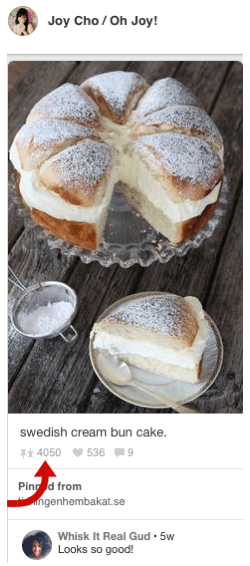
Pro tip: It's good practice to check the link of each image before you repin to make sure you're not directing people to a broken link or dodgy website.

Check your Pinterest stats to see which of your boards are most popular. This information isn't limited only to your owned boards, but also extends to any group boards you pin to.
When you want to share a new original pin from your website or blog, pin it to one of your popular boards and make sure the pin is related to the theme of the board you choose.
#3: Combine Pinterest Analytics With Google Analytics to Identify Traffic-Driving Pins
It's important to have your website verified on Pinterest. Not only does this reinforce your credibility, but it also allows you to view your website stats. This makes it possible to see which of your original pins from your website or blog are the most popular on Pinterest.
You'll want to cross-check this information with Google Analytics and use the combined stats to verify which of your popular pins are driving traffic to your website.
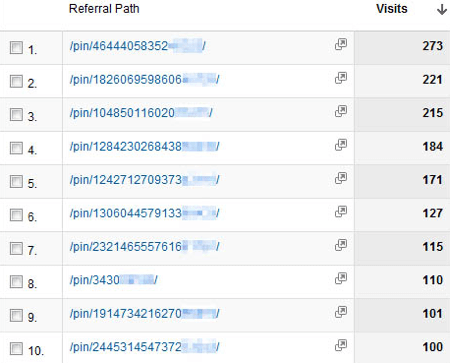
To find out, sign into your Google Analytics account and then go to Acquisition > Referrals > Pinterest. Look at the Visits column to detect high-performing pins. Create similar pins to deliver more of what your audience likes, which will improve your pinning strategy.
#4: Adjust Board Elements for Visibility in Search
If you have a board that isn't getting the visibility you expect or isn't generating the repins you want, you can change your board title to see if the board's performance improves.
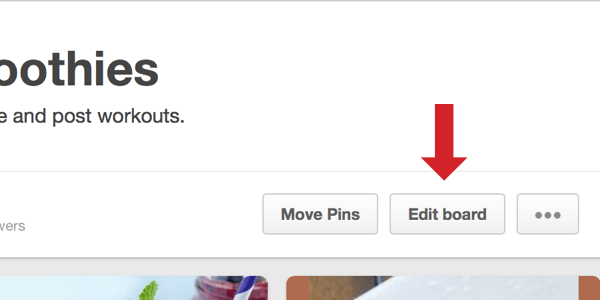
First, click on the board you want to change and then click on the Edit Board button.
Next, you'll see an edit screen where you can change a number of elements for your board, such as the name (or title), description, category, and even cover image.
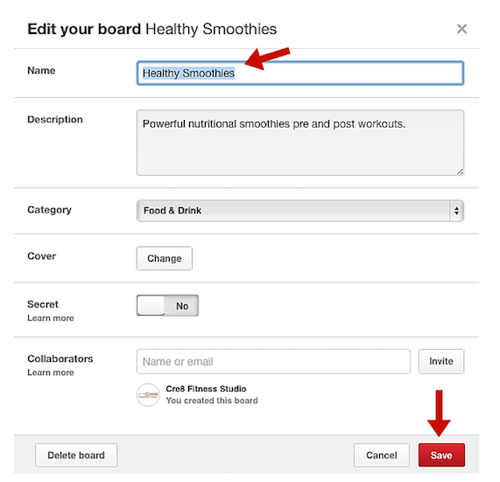
After you give your board a new name, scroll down and click the red Save button. Keep an eye on the newly titled board and make adjustments as necessary.
In Conclusion
If you follow these steps, Pinterest will begin to view your account as popular and will recommend your pins to people searching for terms related to your presence.

What do you think? Can you use these tips to transform your Pinterest account into a high-quality, popular presence? Which tip do you think is most valuable? Please share your thoughts, experiences, and knowledge in the comments below!