by
by 
 Would you like to improve your Twitter marketing?
Are you testing to see what gives you the best results?
Traditionally, split testing is a practice that's applied to individual pages on your website to compare page variations and ultimately determine conclusively which version results in the highest overall conversion rate.
However, implementing split tests on your website alone is short-sighted! In fact, you can harness the power of split testing to generate valuable information about your target audience and their overall engagement with your brand on social media websites.
To see how to do this, let's go step by step through how to carry out a split test on Twitter.
Step #1 – Create Your Split Test Tweet
The first step in the split testing process is to craft the text of the tweeted message you'll use.
As an example, suppose you want to determine when your Twitter followers are most active. While services like Tweriod will estimate popular times, narrowing down these ranges and confirming their effectiveness using split testing will help you determine when future tweets should be published to reach the biggest, most engaged audience.
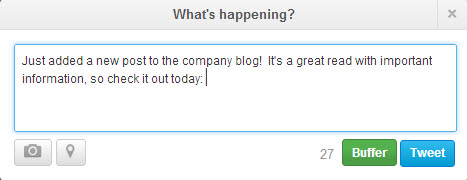
In this specific instance, you'll only need a single tweet, as the test variable in this case will be the different links used to track when followers are most likely to click through to your site.
In other cases where you're testing the content of your individual tweets against each other, you'll need to generate more than one split test tweet.
Obviously, you'll want to include details that are more relevant to your company's value proposition; this example is written to be intentionally generic.
In addition, be sure to leave space at the end of your split test tweet to include the test URLs we'll create in the next step.
Step #2 – Use Bit.ly to Create Split Test Links
Bit.ly and similar URL shortening services allow you to turn long web addresses into shorter variations that fit more easily into character-limited social media updates.
However, they also give savvy users the ability to carry out social media split tests using URLs that vary based on your chosen test protocols.
Following the example above, we need to create two (or more) different Bit.ly links that will be deployed at different times of the day. Although all of the links will redirect to the same location, their individual click-through rates will be used to determine when the sample site's social media followers are most active.
To do this, head over to Bit.ly and log into your account (or create one if you haven't set one up yet). Once inside, paste your destination URL into the field in the upper right-hand corner of the page and click Enter. Doing so will pull up the following screen, which includes your unique shortened link.

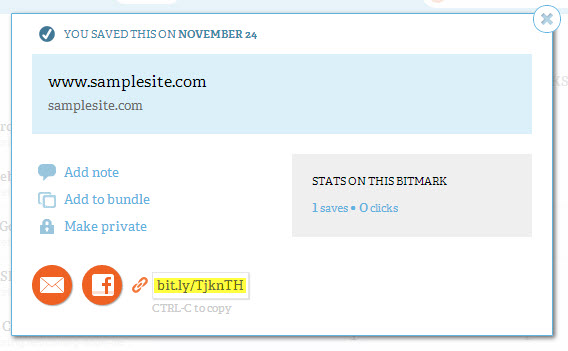
Create as many unique Bit.ly links as times during the day you plan to test, with each individual Bit.ly URL corresponding to a specific timed test tweet.
For example, if you want to test the responsiveness of your audience at 10:00am, 4:00pm and 8:00pm, you'll need to create three separate Bit.ly links, each with a different reference code and each pointing to the same page on your website.
As you do this, be sure to make a note indicating which Bit.ly URL you plan to use during each test period (in this example, the Bit.ly URL pictured above might be associated with the tweet that will be sent out at 10:00am), or consider customizing your Bit.ly URLs to include this information.
If you hover over the highlighted area, a link labeled Customize will appear. Within the screen, you can change the character string used in your link to better reflect your test variable (for example, bit.ly/tenamtest).
Step #3 – Deploy Competing Tweets
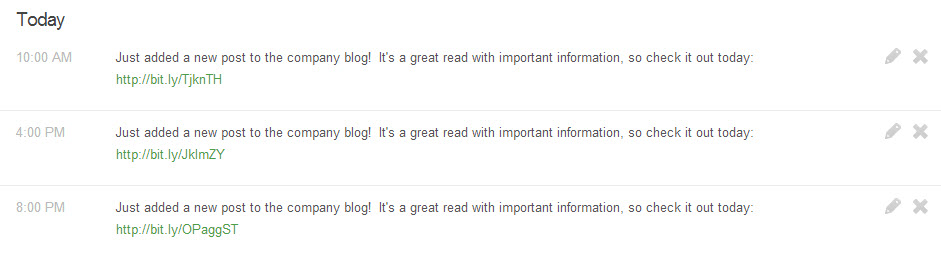
Once you have your tweet text and your test links ready, open a Twitter scheduling tool like Buffer and set up your split test tweets to go live at your specified times (as pictured below):
Step #4 – Analyze Your Results
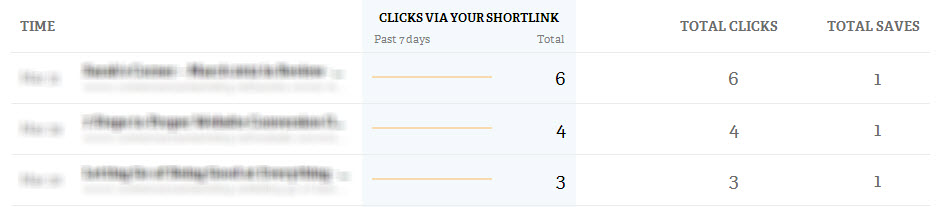
As your tweets go live, you'll be able to monitor the number of clicks each Bit.ly URL receives within the service's Stats dashboard area. Match up the total clicks each tweet receives with the time it went live and you'll have a rough estimate of when your followers are most engaged with your brand's updates.
Step #5 – Expand Your Testing
Of course, keep in mind that a single test – carried out on a single day – won't give you as much usable information as systematic, ongoing testing. As an example, consider that running the above experiment could produce completely different results on a Sunday than it would on a Friday.
A few of the different ways you can expand your testing protocols to generate more meaningful data include:
- Repeat tests across multiple days.
- Testing variables other than tweet times in your updates (for example, you could use this same method to test different benefit propositions, product promotions or other calls to action).
- Carry out tests on other social networks.
Split Testing on Other Social Media Websites
Now that you understand the basic mechanics of split testing on Twitter, you'll probably be able to do it on other social media websites.
The possibilities truly are endless once you grasp the concept of social media update split testing. By taking the time to test your social profile updating assumptions – rather than relying on guesses or the advice of third-party experts – you'll ensure that each new message you post to your social profiles results in the greatest possible impact on your company's online performance.

What do you think? Have you done split testing? What results have you had? Please share your comments in the box below.