by
by 
 Do you use Google Analytics?
Are you leveraging the many apps that work with Google Analytics?
Integrating data from third-party tools, plugins and platforms with Google Analytics helps you gain insight about your online marketing efforts.
In this article I'll share nine tips to help you get more out of Google Analytics.

Listen to this article:
Where to subscribe: Apple Podcasts | Spotify | YouTube Music | YouTube | Amazon Music | RSS
You can also subscribe via RSS, Stitcher and iTunes. How to subscribe/review on iPhone.
#1: Add Google Analytics to WordPress
You can easily add Google Analytics to your self-hosted WordPress website using the Google Analytics by Yoast plugin.
The plugin lets you configure advanced features such as tracking outbound clicks, downloads and internal links that redirect to external websites; for example, affiliate links you create using your own domain (yourdomain.com/affiliate/product).
You can also use it to ignore traffic from admins and other users, track search results pages and 404 pages.
Yoast's premium version offers more advanced features, such as tracking views per author, views per post type and other specific dimensions.
#2: Integrate All Analytics Platforms
If you want to combine Google Analytics data with additional analytics tools and platforms to gain insights about your traffic, try Segment. The platform allows you to manage data from over 100 different advertising, analytics, developer, marketing, sales, support and user testing platforms in one place.
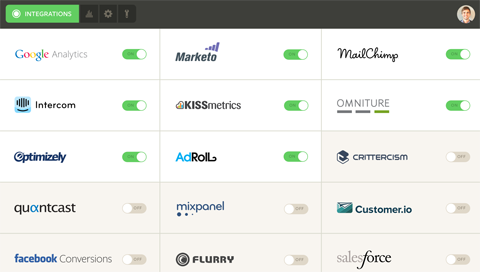
Simply install one piece of tracking code on your website, and the rest of the tracking codes from any platforms you choose are managed by Segment.
Segment offers a free plan for using Google Analytics with 20 other specific platforms. Premium plans for more platform integrations start at $29 per month, based on the integrations you need.
#3: Visualize Google Analytics Data
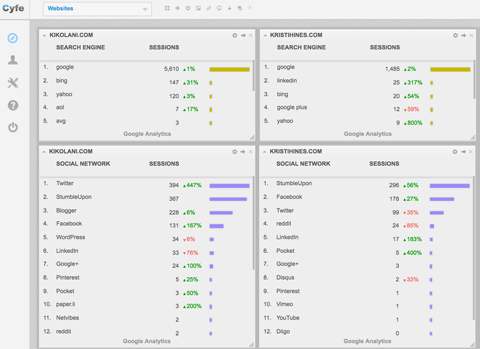
It's possible to view and compare data from multiple websites at the same time in Google Analytics with a tool like Cyfe.
Use Cyfe dashboards to show an overview of all of your websites' pageviews, sessions and users, then analyze the data to identify bigger trends in:
- Conversions, traffic sources, bounce rate and location of users
- Traffic from search engines and social networks
- Real-time traffic, including users, location of users, traffic sources and content they're currently viewing
You can even use it to create dashboards with a detailed view of your websites' real-time traffic, including users, location of users, traffic sources and content they're currently viewing.
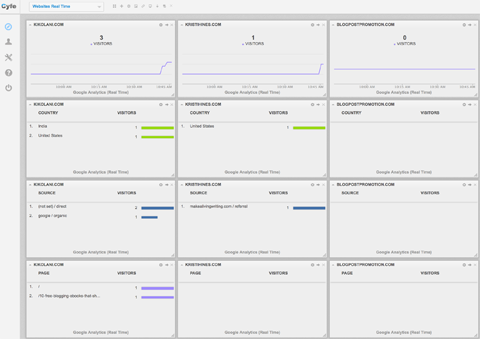
With a premium upgrade, you can create unlimited dashboards and widgets from over 50 advertising, analytics, blogging, email, sales, SEO, social media and support platforms for only $19 per month.
#4: Learn About Email Marketing Traffic
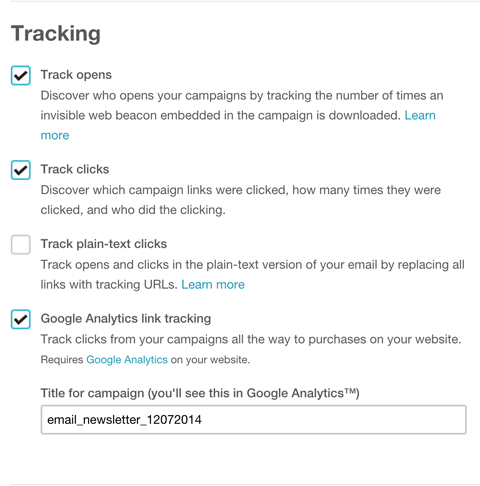
Want to link your email marketing efforts to the traffic in Google Analytics? Email marketing platforms such as MailChimp, GetResponse, Constant Contact and Vertical Response allow you to track traffic from links in your emails to your email campaigns.
For example, MailChimp lets you check one box to add UTM parameters to links when you create an email campaign so you can view traffic from those links inside Google Analytics. You can also set up Google Analytics tracking for your automation emails and campaign archive pages.
#5: Link Social and Website Engagement
If you use social media management tools like Buffer, Hootsuite and Oktopost to publish and schedule updates to your top social media networks, you'll benefit from linking them to Google Analytics.
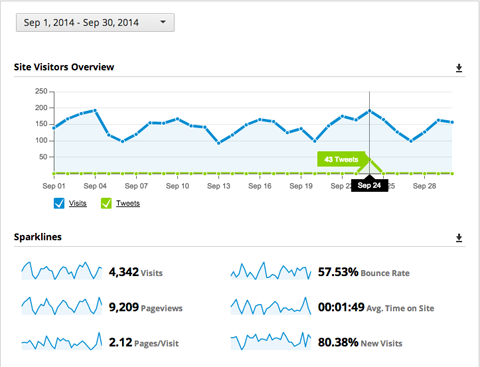
Link Hootsuite and you get an overview report with your Google Analytics data along with the social updates you published through Hootsuite. One custom report is included with the $9.99 per month pro plan.

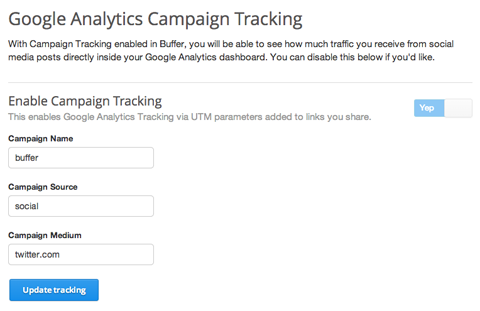
With Buffer, you can customize the UTM parameters you use to track custom campaigns within Google Analytics so they match the updates you publish through Buffer. This option is included in the Buffer for business plans starting at $50 per month.
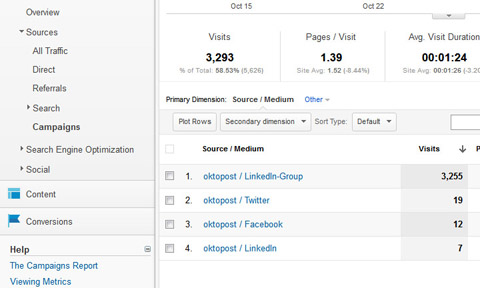
In Oktopost, you can enable Google Analytics to automatically add UTM parameters to any link you publish as a part of an Oktopost campaign. This option is included in the Oktopost premium plans starting at $49 per month.
#6: Find Out if Google Updates Affect Your Website
Add the Fruition Google Penalty Checker to analyze data from your Google Analytics account and determine if your website has been affected positively or negatively by Google updates.
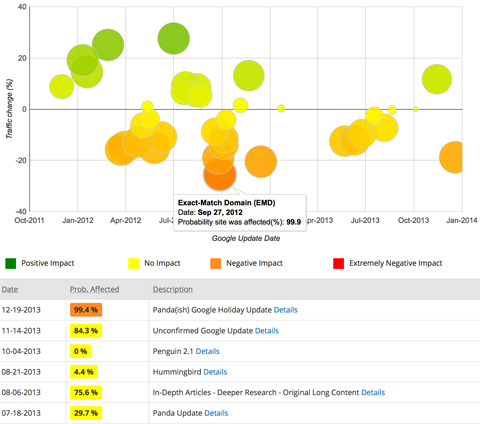
You can sign up for a free account to see how past Google algorithm changes (Penguin, Panda, Hummingbird, etc.) and updates such as the removal of authorship pictures from search results or knowledge box appearance have affected your website.
If you want to see information about updates from the last three months, upgrade to a premium plan starting at $75 per month for an analysis of up to five websites.
#7: Discover Your (Not Provided) Keywords
For search engine marketers, the loss of keyword data in Google Analytics was a tragedy. Various tools like AuthorityLabs are trying to recapture that data again.
AuthorityLabs not only monitors your search engine rankings, it now integrates with Google Analytics and other data points to determine what keywords are driving visitors to your website.
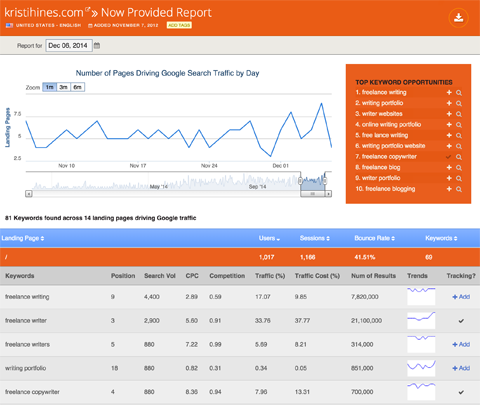
You can use this data to create or optimize landing pages and website content to better target for new keywords.
Premium plans including Google Analytics integration and the not provided keywords report start at $49 per month for up to 50 domains.
#8: Get Insights From Split Testing
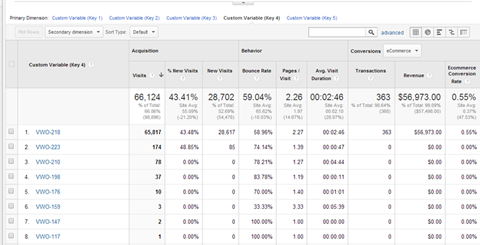
You can integrate split testing tools like Visual Website Optimizer or Optimizely with Google Analytics to track the traffic you receive to your campaigns. For example, Visual Website Optimizer shows reports like this for your split testing campaigns.
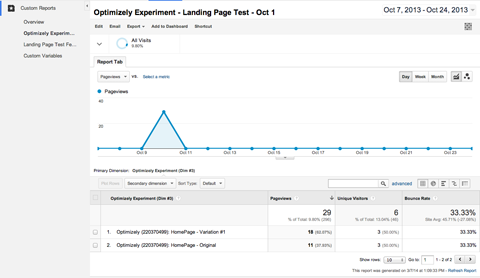
Need a custom split testing report? Optimizely lets you create reports like this for your campaigns.
#9: Link Ecommerce Sales Data
Ecommerce platforms such as Shopify, Magento and Bigcommerce offer detailed instructions on how to integrate with Google Analytics to get insights from ecommerce tracking reports.
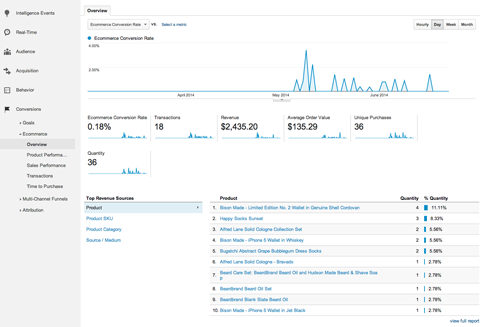
These reports can help you learn a lot about your ecommerce revenue, from which products generate the most revenue to the top traffic sources that send visitors who ultimately purchase your products.
Conclusion
Google Analytics integration isn't limited to ecommerce, search, social media and testing tools. To find an integration not listed in this article, do a Google search for the tool or platform you use, plus “Google Analytics.” You can also find integrations for Google Analytics from Tapstream, Freshdesk, Zendesk and Formstack.

What do you think? Are you interested in getting additional insights into your website traffic? What are your favorite Google Analytics tips? What have you learned from them? Please share in the comments!